If you want Grammarly alternatives for Mac, you probably want one of two things. Either you want grammar fixes and AI rewriting in every app you type in (Mail, Slack, Notes, the browser) without another monthly bill, or you are uneasy about a cloud service reading everything you write. Often it is both.
This guide covers seven options that work on a Mac, from free tools already built into macOS to a paid app you buy once. For each one we cover what it costs as of November 2026, where it works, and where it falls short. We also say plainly where Grammarly is still better, because for some people it is.
Why people look for a Grammarly alternative on Mac
The first reason is cost over time. Grammarly Pro is $12 per member per month billed annually, or $30 if you pay month to month, as listed on Grammarly's Pro page in November 2026. That is fine for a year. Over three or four years it adds up to more than most Mac apps you will ever buy.
The second reason is the free plan's ceiling. Grammarly Free gives you spelling and grammar checks and 100 generative AI prompts a month. Full-sentence rewrites and tone adjustments sit behind the paid plan, and so does the larger allowance of 2,000 prompts a month. If you mainly want "rewrite this to sound less blunt", the free plan runs out quickly.
The third reason is privacy. Grammarly's privacy policy says its algorithms analyze your text to produce suggestions and that it stores data on servers hosted by Amazon Web Services. It also says it never sells the content you upload. That is a reasonable policy, but some people simply do not want a third party in the loop for every email, contract and Slack message. Grammarly does let you turn it off per app, which helps, but it is opt-out rather than opt-in.
To be fair to Grammarly, its strongest feature is real. It underlines problems as you type, in a huge range of apps, without you doing anything. Not every tool on this list does that, including our own. Keep that trade-off in mind as you read.
Grammarly alternatives for Mac compared
| App | Price | Best for | Key strength | Key limit |
|---|---|---|---|---|
| MacMemo | $199 once, 3 Macs | AI fixes and rewrites in any app, plus a launcher | Your own AI key or local Ollama model; no subscription | No as-you-type underlines; no free tier or trial |
| Apple Writing Tools | Included with Apple Intelligence | Free proofreading and rewrites on newer Macs | Built into macOS, works in most apps | Needs a Mac with M1 or later; language and region limits |
| LanguageTool | Free; Premium from €19.90 a month or €59.89 a year | Multilingual writers who want underlines | As-you-type checks in Mail, Notes, Messages and more | Browser extension is now Premium only |
| ProWritingAid | Free; Premium monthly, yearly or lifetime | Novelists and long-form writers | Detailed style reports and a lifetime license | Free plan checks 500 words at a time |
| QuillBot | Free; Premium $19.95 a month or $99.95 a year | Paraphrasing and summarizing | Many paraphrase modes, macOS app | Free paraphrasing capped at 125 words |
| DeepL Write | Free editor; Write Pro add-on €6.99 a month (annual) | Polishing tone and wording | Style and tone choices, Mac app | Pro pricing is an add-on to a DeepL plan |
| Raycast AI | Pro $10 a month or $96 a year | Raycast users who want AI too | AI commands plus a large extension store | AI is not on the free plan; credit limits |
How we picked
We looked at the jobs people actually use Grammarly for on a Mac, then checked each tool against them using the vendor's own pricing pages, help centers and product pages.
- Works outside the browser. Mail, Slack, Notes, Messages and Pages matter as much as Gmail in Chrome.
- Fixes grammar and rewrites. Spelling fixes alone are covered by macOS. We wanted tone changes, shortening and rewording too.
- Clear pricing. A real free tier, a reasonable subscription, or a one-time price. We noted where prices are only shown in local currency.
- Privacy you can reason about. Where does your text go, and can you keep it on the Mac?
- Mac fit. A native app or a proper macOS integration beats a web page you paste into.
1. MacMemo: the best Grammarly alternative for Mac if you hate subscriptions
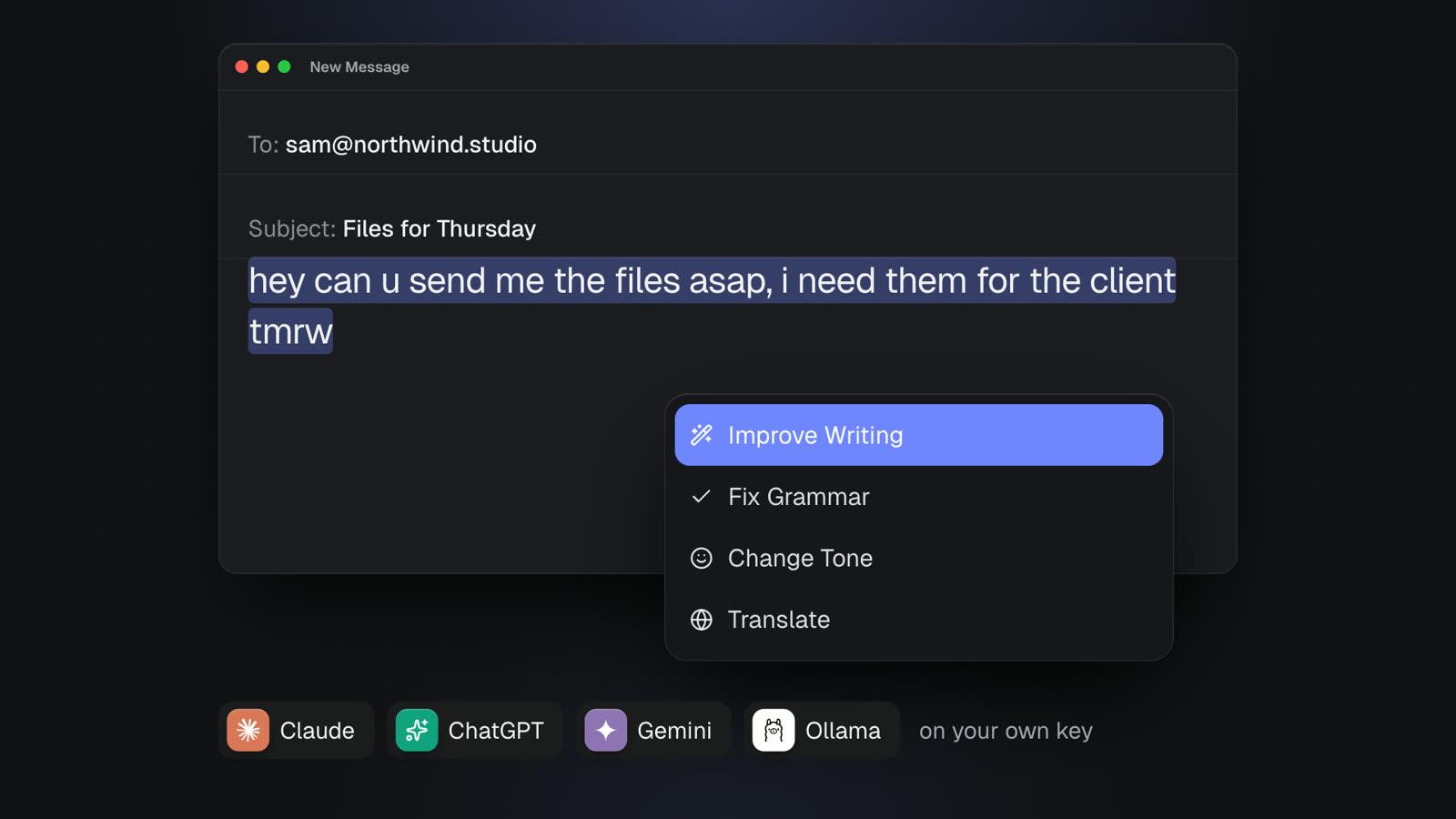
MacMemo is a native Swift app for macOS 14 Sonoma or later, on Apple Silicon and Intel. It is a launcher first (press ⌥ Space from any app), but the part that matters here is its AI on selected text. Select a sentence or a whole email in any app, press ⌥⇧Space, and pick a command.
What the writing commands do
The built-in commands cover what most people pay Grammarly for:
- Fix Spelling and Grammar: replaces your selected text in place with the corrected version.
- Improve Writing, Make Shorter and Make Longer.
- Change Tone to Friendly and Change Tone to Professional.
- Summarize and Explain This for text you are reading rather than writing.
- Draft a Reply for the email or message you have selected.
- Translate to English. Other languages are a custom command you write once.
- Explain Code and Find Bugs in Code, if you also write code.
For commands that show an answer instead of replacing text, ⌘↩ swaps your selection for the result. You can also write your own commands and give each one its own model. So "rewrite this in British English" or "translate to German, keep it formal" becomes one command you reuse everywhere.
Your own AI key, or no cloud at all
MacMemo does not sell AI credits. You paste an API key from Anthropic (Claude), OpenAI (ChatGPT models), Google Gemini, OpenRouter, Groq, Mistral or DeepSeek, and MacMemo detects the provider. Keys live in the macOS Keychain, and requests go straight from your Mac to that provider, never through MacMemo's servers.
If you do not want your text leaving the Mac at all, point MacMemo at a local model through Ollama, which needs no key. That is the option for people whose main worry about Grammarly is privacy. Be clear about the trade-off: with a cloud key, your selected text goes to the provider you chose, under that provider's terms. With Ollama, it stays local, and quality depends on the model you run.
The other things it does for writers
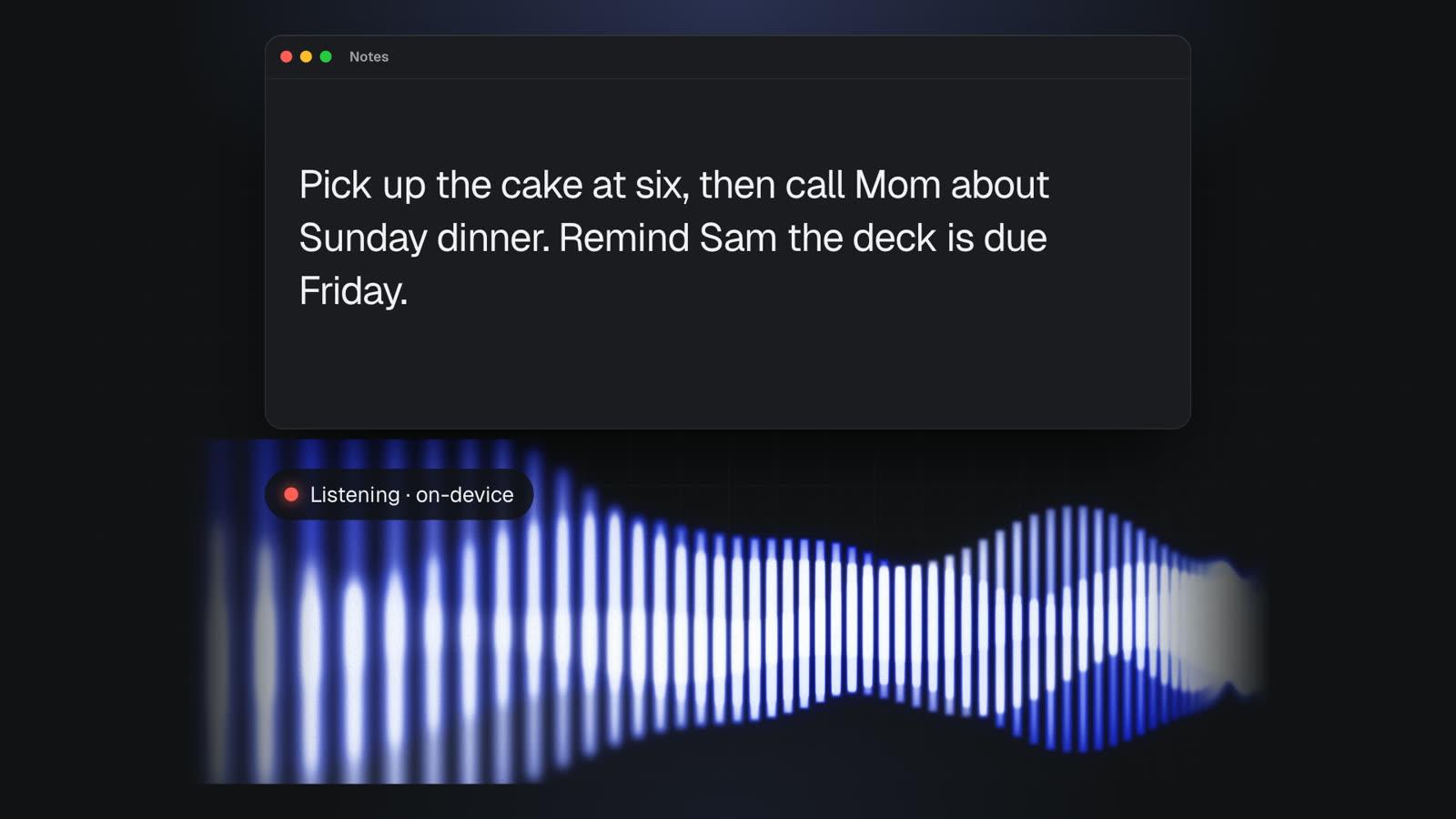
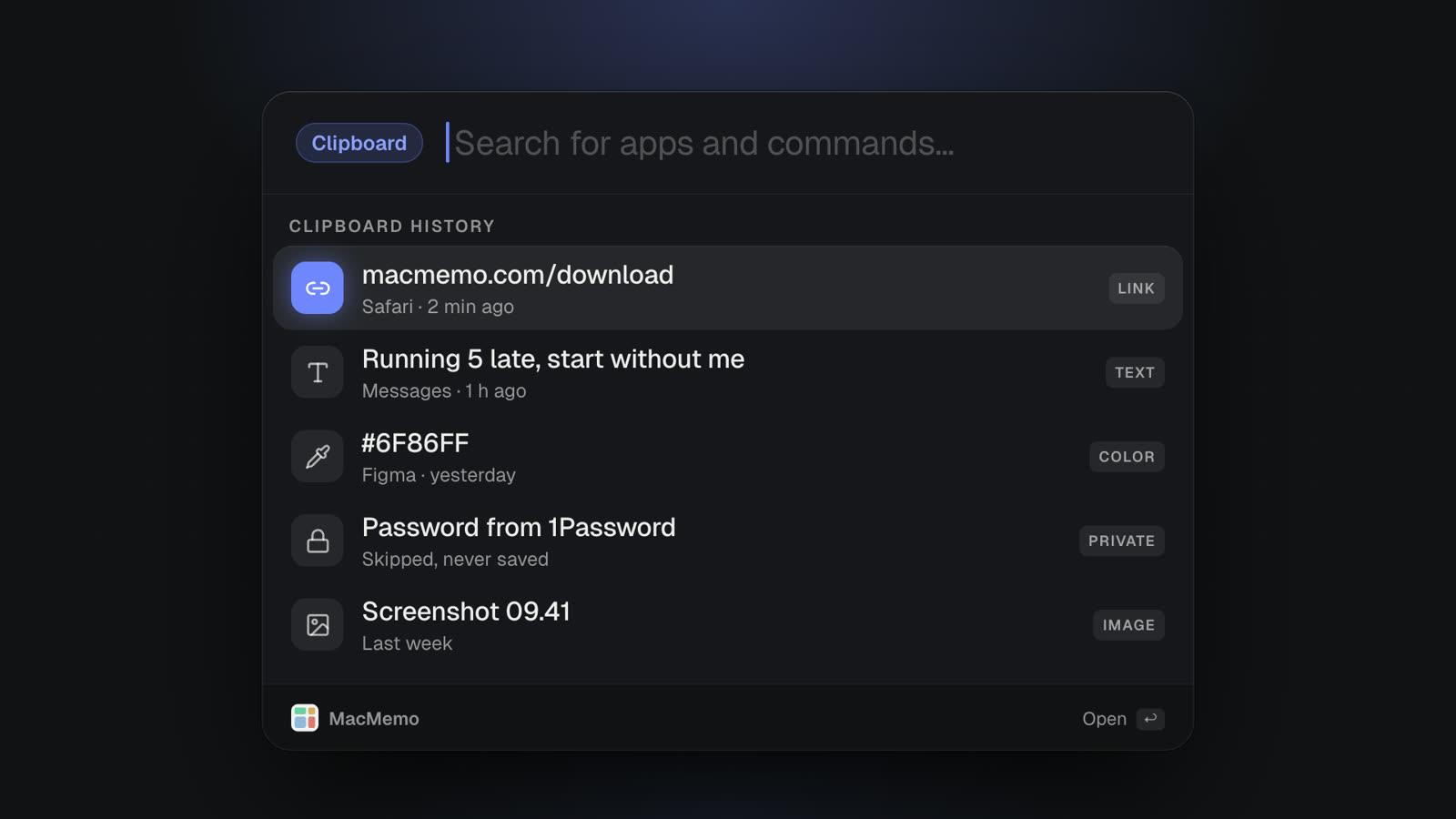
A few other features earn their place if you write all day. Voice dictation works by holding fn, speaking and letting go, and the text is typed wherever your cursor is. It runs on-device and offline using Apple's speech engine (SpeechAnalyzer on macOS 26 and later), strips filler words like "um", and supports "scratch that" to delete the last sentence. Snippets expand a keyword like ;sig into your signature in any app. Clipboard history keeps text, links, colours and images, and skips items that password managers mark as concealed.
There is also an AI chat with history saved on the Mac (⌘Y), and Ask About Screen, which attaches the window you were in so you can ask what an error or a dense paragraph means. The full list is on the features section of our homepage.
Pricing
MacMemo costs $199 once for a lifetime license that covers 3 personal Macs and every future update. There is no subscription and no AI credits to buy, since AI runs on your own key. There is no free tier and no trial, but there is a full refund within 14 days. Details are on the pricing section.
Pros
- Works on selected text in any Mac app, including Mail, Slack, Notes and the browser.
- Pick your AI provider, or run fully local with Ollama.
- One payment instead of a yearly bill, covering 3 Macs.
- Custom commands for your own house style or other languages.
- No account needed. Clipboard history, chats and settings stay on the Mac.
- Replaces several utilities at once: launcher, clipboard manager, snippets, dictation and window snapping.
Cons
- No as-you-type underlines. MacMemo does not watch what you type. You select text and press ⌥⇧Space. If you rely on Grammarly catching mistakes you did not know were there, this is a real difference.
- AI needs your own API key (or an Ollama model), which is one more setup step and a separate bill from the provider if you use a cloud model.
- Paid only. No free tier, no trial, though the 14-day refund covers you.
- Mac only. No Windows, and no cloud sync between Macs.
- Young app from a small team, without the decade of grammar rules that dedicated checkers have built up.
Verdict: MacMemo is the best Grammarly alternative for Mac if you want grammar fixes and rewriting on demand, in every app, without a subscription, and with control over where your text goes. If you need constant background underlining, pair it with Apple's built-in checks or pick LanguageTool instead.
2. Apple Intelligence Writing Tools: the free Grammarly alternative already on your Mac
If your Mac supports Apple Intelligence, you already have a capable writing assistant. According to Apple's Writing Tools guide, you select text, Control-click, choose Writing Tools and then Show Writing Tools. From there you can Proofread, Rewrite with an optional Friendly, Professional or Concise tone, Summarize, pull out Key Points, or describe the change you want in your own words.
Apple says Writing Tools works in most places you write, including third-party apps and websites. There is also a Compose option that hands your request to ChatGPT, if the ChatGPT extension is available in your region. Apple's Apple Intelligence page also describes proofreading that checks grammar and spelling "virtually anywhere you type".
Requirements and pricing
Apple's compatibility list covers Macs with M1 or later, so Intel Macs are left out. Apple notes that Apple Intelligence on macOS 27 is not available in all languages or regions and that usage limits may apply. Apple does not list a price. Its page says features that rely on server models have daily usage limits, and that expanded access will be available for a fee in the future.
On privacy, Apple describes a mix of on-device processing and Private Cloud Compute for larger models, and states that data sent to Private Cloud Compute is never stored and is used only for your requests.
- Pros: no extra cost today, built into macOS, strong privacy story, works in most apps.
- Cons: needs Apple Silicon, language and region limits, usage limits, and you cannot pick your own model or write saved custom commands.
Verdict: the best free Grammarly alternative for anyone on an M1 or newer Mac. Try it before paying for anything. If you hit its limits (Intel Mac, unsupported language, or you want custom commands and model choice), look at the paid options below.
3. LanguageTool: the closest match to Grammarly's underlines
LanguageTool is the pick if as-you-type underlining is the Grammarly feature you cannot give up. Its Mac app checks spelling, grammar and style in Apple Mail, Messages and Notes, with Microsoft Word, Slack and Teams in beta. LanguageTool says errors are underlined right where you write, and for other apps a shortcut opens your text in its editor. It needs Accessibility permission and an internet connection for its advanced checks.
Its other strength is languages. The premium page says it comes in 30+ languages, with enhanced Premium checks for English, German, French, Spanish, Dutch, Polish and Portuguese. If you write in more than one language every day, this matters more than any AI rewrite feature.
Free tier and pricing
The free plan is limited. LanguageTool's premium page lists a 2,000-character limit per text field and 3 AI sentence rephrasings a day on Basic. Its help center also says the browser extension is now available only to Premium subscribers, and free users get the Grammar Checker and Paraphrasing Tool through the website. The Mac app's own page says basic checking in supported apps does not require an account, but only Premium shows all errors.
Premium is €19.90 a month, €39.90 a quarter, €59.89 a year, or €99.90 for two years, according to LanguageTool's subscription help article. The premium page itself did not show prices when we checked, so confirm in your currency at checkout.
- Pros: real as-you-type underlines in Mac apps, strong multilingual support, annual Premium is cheap compared with Grammarly.
- Cons: the free tier is thin and the browser extension is Premium only, AI rewriting is lighter than a dedicated LLM tool, and your text is checked online.
Verdict: the best Grammarly Premium alternative if you want the same always-on behavior for less money, especially in several languages.
4. ProWritingAid: for long-form and fiction writers
ProWritingAid is built for people writing chapters, not Slack replies. Its strength is reports on style, pacing and repetition across a whole document, plus tools aimed at fiction such as Story Canvas and Creative Nudges. On the Mac, Desktop Everywhere puts a floating icon inside writing apps. Its help center says the Realtime Checker underlines spelling, grammar and style issues as you type, and names Microsoft Word, Scrivener, Apple Pages and Notion among supported apps.
Free tier and pricing
The free plan includes grammar, spelling and punctuation checks, 10 rephrases a day, and line editing reports twice a day on up to 500 words, and free accounts get suggestions for 500 words at a time. Paid plans come as Premium and Premium Pro, each with monthly, yearly or one-time lifetime billing. The ProWritingAid pricing page shows prices in your local currency, so check it for your exact figure. On the version we saw, yearly billing worked out to a third of the monthly price per month, and yearly and lifetime plans carry a 3-day money-back guarantee while monthly plans are not refundable.
- Pros: the deepest style analysis on this list, a lifetime license option, underlines in common Mac writing apps.
- Cons: overkill for email and chat, the free plan's 500-word window is tight, and the refund window is short.
Verdict: the best Grammarly alternative for novelists and long-form writers, especially if a lifetime license appeals to you.
5. QuillBot: paraphrasing first
QuillBot started as a paraphraser and still leads with it. Premium gives full paraphrasing access, 9 built-in modes plus custom modes, advanced grammar suggestions, a summarizer that takes up to 6,000 words, a plagiarism checker with 25,000 words a month, and an AI humanizer. Its premium page lists a macOS app along with Chrome, Edge and Safari extensions and a Word add-in.
Free tier and pricing
The free plan paraphrases up to 125 words at a time in 2 modes (Standard and Fluency), fixes basic grammar errors, and summarizes up to 1,200 words. QuillBot's own FAQ lists Premium at $19.95 a month or $99.95 billed yearly ($8.33 a month), with a pause option. See QuillBot's pricing FAQ. Its premium page shows local currency, so your checkout price may differ.
- Pros: many paraphrase modes, summarizer and citation tools in one subscription, a macOS app.
- Cons: grammar checking is secondary to rewriting, the free paraphraser limit is short, and it is aimed more at students and content writers than at people answering email all day.
Verdict: pick QuillBot if rephrasing is your main job and grammar fixes are a bonus.
6. DeepL Write: polishing tone and wording
DeepL Write comes from the DeepL translation team. You type or paste text, and it suggests corrections, alternative words and rephrased sentences, with a choice of writing style and tone for your audience. The DeepL Mac app page says Write is included and describes it as available wherever you write. It requires macOS 14 or later. The page documents a selected-text shortcut for translation (⌘C pressed twice) but does not describe one for Write, so do not count on the same flow.
Pricing
DeepL's plan comparison shows a free version without Write Pro. DeepL's Pro page lists Write Pro as an add-on at €6.99 per user a month billed annually, on top of a DeepL plan. The Individual plan is €7.49 a month billed annually, and Write Pro is included in the Business plan at €49.99 per user a month.
- Pros: natural-sounding rewrites, style and tone choices, a natural fit if you already use DeepL to translate.
- Cons: pricing stacks an add-on onto a base plan, and the Mac workflow for Write is less clearly documented than translation.
Verdict: a good choice for non-native English writers and anyone already paying for DeepL.
7. Raycast AI: if you already use Raycast
Raycast is a Mac launcher with AI Commands, AI Chat and a large public extension store. If you already use it daily, its AI can cover some of what Grammarly does through commands you run on text. Raycast's pricing page lists Pro at $10 a month or $96 a year, Plus at $20 a month and Max at $50 a month. AI is not included on the free plan. Pro includes 500 AI credits a month and bring-your-own-key support.
- Pros: the extension store is unmatched, and BYOK is available on Pro.
- Cons: AI is a subscription with monthly credit limits, and it is a launcher first, not a grammar checker.
Verdict: worth it if you want Raycast's extensions anyway. If you are comparing launchers, our guide to Raycast alternatives goes deeper.
Grammarly vs MacMemo
These two tools solve the same problem in different ways, so the right choice depends on how you write.
| Grammarly | MacMemo | |
|---|---|---|
| How it works | Watches as you type and underlines issues | You select text and press ⌥⇧Space |
| Price | Free plan; Pro $12 a month billed annually or $30 monthly | $199 once, 3 Macs, 14-day refund |
| AI limits | 100 prompts a month free, 2,000 on Pro | Set by your own API key, or local with Ollama |
| Where text goes | Grammarly's service | Your chosen AI provider, or stays on the Mac with Ollama |
| Platforms | Mac, Windows, browsers, iPhone, iPad, Android | Mac only |
Choose Grammarly if you want mistakes caught without thinking about it, you work across Windows and phones too, or your team already uses its style guides. Its always-on underlining is something MacMemo does not do.
Choose MacMemo if you know when you want help (before sending an email, after drafting a doc), you want to stop paying every month, and you want to choose the AI model or keep text on your Mac. You also get a launcher, clipboard history and offline dictation in the same app. Our FAQ covers setup questions, including how API keys work.
You can also combine tools: macOS's built-in spell check or Apple's proofreading for typos, and MacMemo for rewrites, tone changes and replies. That covers most of what a Grammarly subscription does.
Which Grammarly alternative for Mac should you choose?
- You want to pay once and fix text in any app: MacMemo.
- You want it free and have an M1 or newer Mac: Apple Intelligence Writing Tools.
- You want Grammarly-style underlines for less: LanguageTool Premium.
- You write in several languages: LanguageTool, or DeepL Write if you already translate with DeepL.
- You write novels or long reports: ProWritingAid.
- You mostly paraphrase and summarize: QuillBot.
- You already live in Raycast and want its extensions: Raycast Pro.
- Privacy is the deciding factor: MacMemo with a local Ollama model, or Apple's on-device Writing Tools.
If you also dictate a lot, our comparison of Wispr Flow alternatives covers voice typing on the Mac. If you are replacing Spotlight too, see the Spotlight alternatives guide. More comparisons are on the blog.
FAQ about Grammarly alternatives for Mac
What is the best free Grammarly alternative for Mac?
If your Mac has an M1 chip or later, Apple Intelligence Writing Tools is the best free option. It proofreads, rewrites in different tones and summarizes in most apps, at no extra cost listed by Apple. On an Intel Mac, LanguageTool's free tier or QuillBot's free plan are the next things to try.
Is there a Grammarly alternative without a subscription?
Yes. MacMemo is $199 once for 3 Macs, and AI runs on your own API key or a local model. ProWritingAid also sells a one-time lifetime license alongside its subscriptions.
Does MacMemo underline mistakes as I type like Grammarly?
No. MacMemo works on text you select: press ⌥⇧Space and choose Fix Spelling and Grammar, Improve Writing or another command. If you want constant background underlining, LanguageTool and ProWritingAid both offer it on the Mac.
Can I check grammar on a Mac without sending text to the cloud?
With MacMemo you can connect a local model through Ollama, so your text stays on the Mac. Apple's Writing Tools also do some processing on-device, and use Private Cloud Compute for larger requests.
How much does Grammarly Pro cost in 2026?
Grammarly's Pro page lists $12 per member per month billed annually, or $30 billed monthly, as of November 2026. The free plan includes 100 generative AI prompts a month, and Pro includes 2,000.
Does Apple Intelligence work on Intel Macs?
No. Apple's compatibility list covers Macs with M1 or later. On an Intel Mac you need a third-party tool such as MacMemo (which supports Intel), LanguageTool or QuillBot.
Which Grammarly alternative is best for non-native English speakers?
LanguageTool is strong for people who switch between languages, and DeepL Write is good at making text sound natural. MacMemo's Translate to English command, plus custom commands for other languages, helps if you draft in one language and send in another.
Do I need to pay for AI separately with MacMemo?
If you use a cloud provider like Claude, ChatGPT or Gemini, you pay that provider for your usage through your own key. If you use a local model through Ollama, there is no key and no provider bill.
Grammarly is still the most polished always-on checker. But if what you actually want is quick grammar fixes and rewrites in every Mac app, the alternatives above cover it for less money and with more control over where your words go. Start with Apple's free Writing Tools if your Mac supports them, and move to a paid tool only when you hit a limit.